Inside ARENA v1.7.0: A Radical UX Redesign Built for High-Velocity Newsrooms and Editors
Discover ARENA v1.7.0’s radical UX overhaul: Asset Inspector, multi-track Studio Pro-Tool, and background uploads built for modern editors.
In the fast-paced world of digital broadcasting and enterprise media creation, a software tool's efficiency isn't measured in abstract terms—it's measured in clicks, scrolls, and screen layout. While version 1.6.0 made AI actionable across our entire system, ARENA v1.7.0 is fundamentally about the User Experience (UX).
We completely re-engineered the interfaces where video editors, journalists, and media operators spend their entire working days: the asset page, the editing studio, and the upload pipeline. The goal? Turn a powerful, capable system into a highly polished, seamless daily workspace.
If your media hub, production house, or broadcasting agency relies on lightning-fast Turnaround Time (TAT), here is how the new look and feel of ARENA v1.7.0 changes everything.
The Big Three UX Core Modules in v1.7.0
As seen in the detailed breakdown from our latest engineering release notes (image_a70622.png), the core platform update introduces three distinct workspace overhauls:
1. The Asset Inspector: Dense, Professional, and Scroll-Free
We’ve replaced our legacy asset details page with a highly functional, compact Asset Inspector.
Content-First Viewer: The preview player takes center stage, accompanied by an above-the-fold AI summary. Editors no longer need to scroll down just to see what the AI already knows about the clip.
Collapsible Side Inspector: Everything you need is docked elegantly on the side. Details, keywords, descriptions, AI analytics status, and distribution data are concentrated into a single glance.
Fixed Action Bar: Core actions—Share, Distribute, Download, and Studio—are pinned at the top of the screen. They are always exactly one click away.
5-Tab Content Panel: Neatly organizes Metadata, AI Segmentation, Transcription, Clips, and Attachments directly under the viewer.
Responsive Media Adapters: The UI dynamically morphs based on whether you are working with video, audio, or images, ensuring your canvas always feels natural to the specific medium.
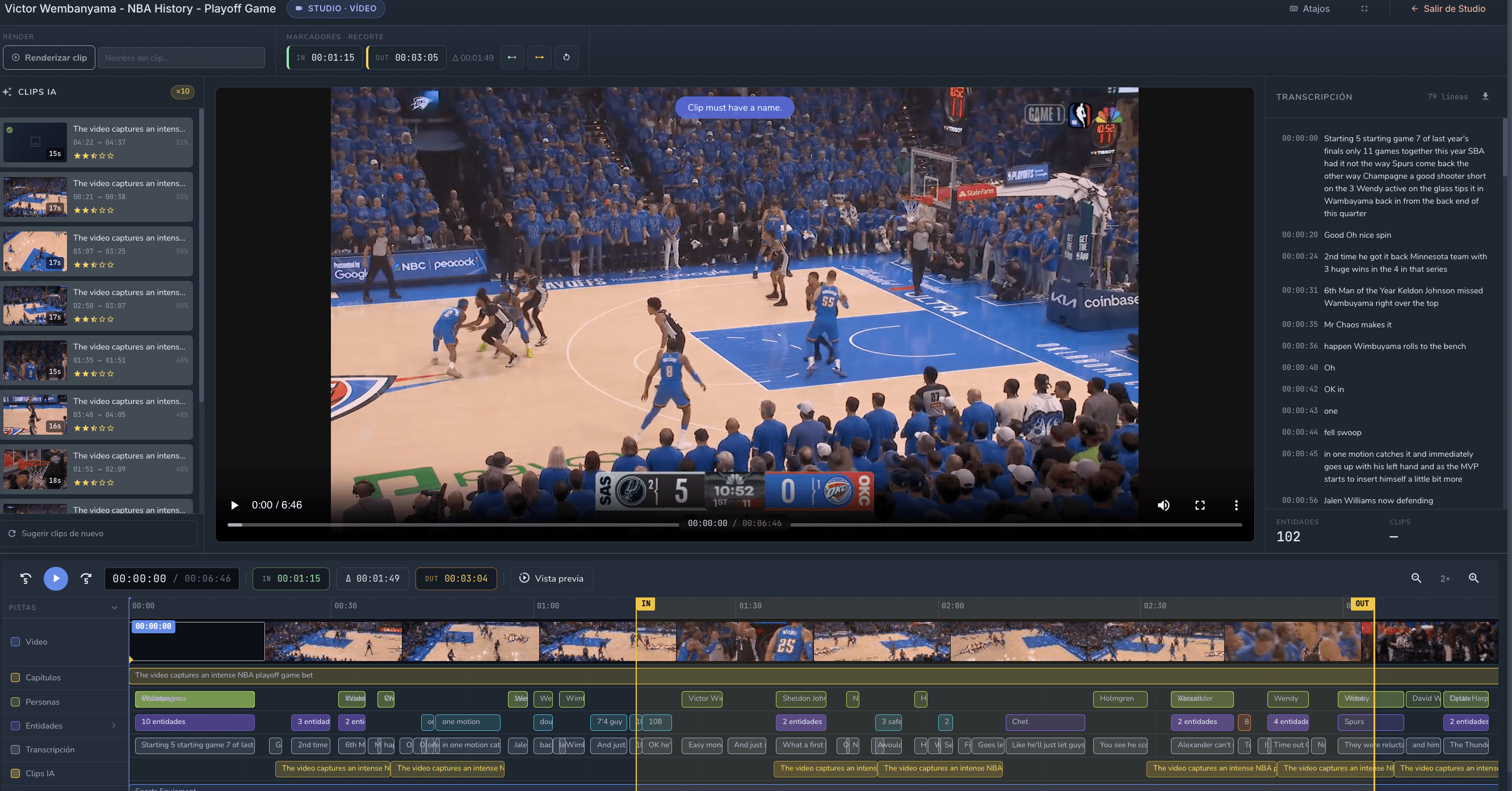
2. Studio Pro-Tool: A Dedicated Multi-Track Editing Powerhouse
The timeline editing experience has evolved beyond the asset page and stepped into its own professional, dedicated workspace.
Isolated Asset Environment: Opening the Studio drops you into an exclusive asset screen with its own independent top bar and tool ribbon. No shared screen space with the asset inspector.
Three-Panel Layout: A beautifully efficient array that positions AI clip suggestions, the preview monitor, and the transcription inspector directly alongside one another.
7-Track Synchronized Timeline: A parallel multi-track timeline that simultaneously maps video, audio, transcription, entities, and markers. It features a precision input/output selection band for ultra-tight clipping.
Real-Time Scrubbing & Sync: The player, timeline, transcription, and entity markers are completely locked together. Clicking a word in the text transcript instantly snaps the playback cursor to that exact moment on the timeline, and vice-versa.
3. Background Upload Manager: Drop Files and Keep Working
Legacy MAM platforms often force users to stare at loading bars, locking them inside an upload wizard until a file transfer completes. Not anymore.
Drag-and-Drop Ingestion: Simply drop files directly over the Media Library for rapid ingestion without losing your place. File titles are automatically derived, and storage destinations resolve themselves silently.
Service Worker Resilience: Driven by a robust background Service Worker, your uploads survive page navigation. You can explore archives, tag other projects, and review assets while heavy media continues to upload.
Global Navigation Status: A floating, persistent status tracker in the main navigation bar keeps file progress visible at all times, offering instant cancel or retry buttons.
Instant Placeholder Grid: Uploading files instantly appear as visual markers in your media grid, ensuring your asset library reflects incoming real-time media pipeline updates.
Daily Operational Impact: What Your Creative Teams Actually Experience
When comparing ARENA v1.7.0 to traditional, rigid Media Asset Management (MAM) setups, the friction reduction across everyday tasks is immense:
For Journalists & Field Editors: Less time getting oriented, more time producing. Because the AI summary, transcripts, and primary action buttons require zero scrolling, orientation happens in seconds.
For Advanced Editors: Cycle times for cutting, clipping, and exporting are cut drastically. The multi-track timeline and text-based scrubbing mean you can compile, trim, and push highlights without ever leaving the dedicated Studio.
For Media Operators: Heavy ingests no longer grind productivity to a halt. The background manager ensures that if a network hitch occurs, failed parts can be retried without starting the entire ingest over from scratch.
Polished, Stable, and Ready for Scale
Beyond the brand-new visual architecture, version 1.7.0 acts as a consolidation release. It fixes regressions introduced by previous folder redesigns and brings a final layer of interface polish to both the asset pages and Studio layouts prior to deployment.
The result is a unified, cutting-edge interface that eliminates the constant page reloads, frantic button hunting, and unnecessary clicks that slow down modern media production. It is an upgrade every user will physically notice within their first hour of work.